Instagram's actual GIF policy, observed in the wild
Test it yourself and the behavior is consistent: hand the feed composer a raw .gif and Instagram either refuses it or flattens it into a single still frame. There is no GIF upload button and no secret setting. The app is built around photos and video, and a .gif file is neither as far as the feed is concerned.
The GIPHY stickers inside Stories muddy the water, because they look like GIF support. They're a licensed sticker library, not a door for your own files. So the practical question was never "how do I force a GIF onto Instagram" but "where does Instagram willingly play a short loop," because a short loop and a GIF are the same idea wearing different containers.
The three doors that actually open
- Stories and Reels. The natural habitat. A one-to-three second loop cropped to 9:16 plays full-screen and reads exactly like a GIF, even though you technically posted a short video.
- Direct messages. The closest Instagram gets to true GIF behavior: a small loop sent in a DM plays inline and repeats, which is where reaction-GIF culture lives on IG.
- The feed, reluctantly. The grid takes stills and videos. If the loop must appear there, post it as a short video and make peace with the label.
Notice what all three share: they want a tight, deliberate loop. That part is on you, and it's the part a converter can be genuinely good at.
Get the loop right before the app ever sees it
Start from a real video file: something off your camera roll (the iPhone route is the most common), a screen recording, a clip you have the rights to. Load it into What the GIF and the whole conversion runs inside the tab, which suits Instagram material especially, since the footage is usually your face, your kid, or a draft of something you haven't decided to post.
Then chase the seam. A loop reads as continuous when the closing frame flows into the opening one, and as a hiccup when it doesn't. The trim handles snap to real frames, and the keyboard shifts them singly, so you can walk the two ends toward each other until the join disappears. It's fiddly for ninety seconds and then it's perfect forever.
Shapes, and what to do when clips disagree
Crop to 9:16 for Stories and Reels so the loop owns the full screen instead of getting re-framed by the app. For DMs, where the loop sits small in a chat bubble, 1:1 and 4:5 both read well. The crop is ratio-locked, so the geometry is exact every time.
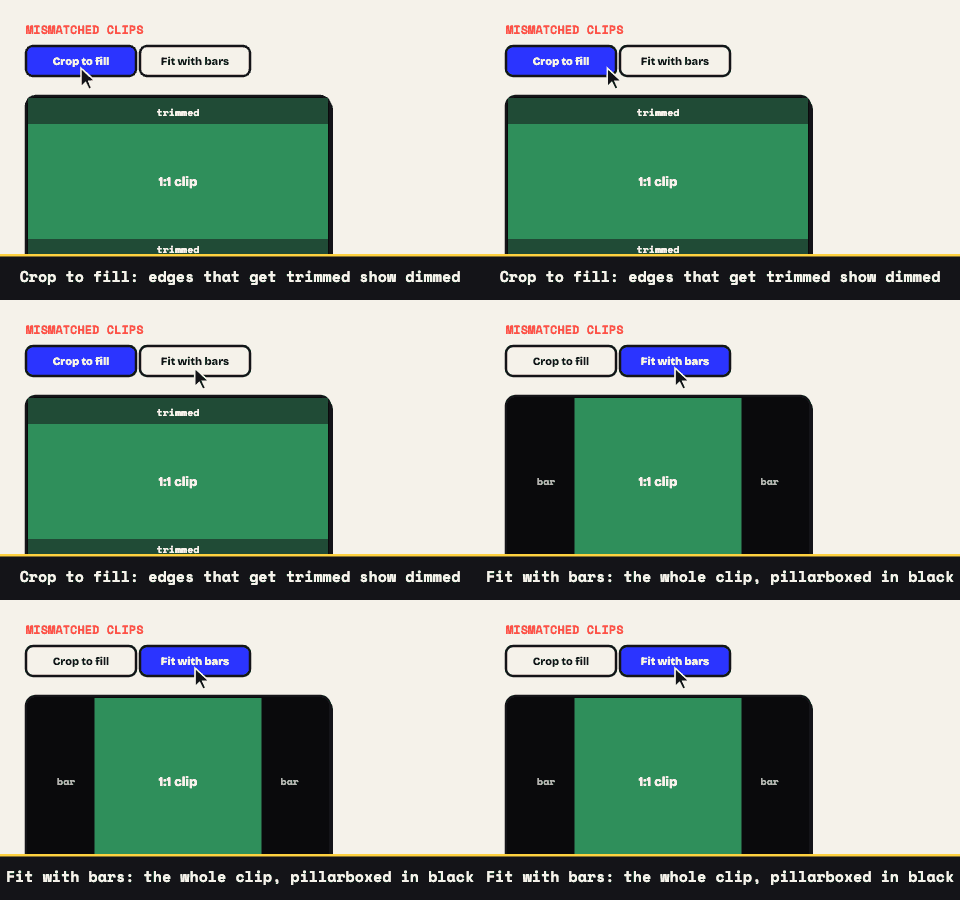
Mixing sources is where shapes fight. A sequence here can hold ten clips at most, and when a landscape screen grab joins a vertical phone clip, one of them won't match the output frame. That's what the Mismatched Clips option decides. Choose Crop to fill and the odd clip scales up until the frame is full, with the preview dimming whatever falls outside the edge; choose Fit with bars and the entire clip stays visible between genuine letterbox bars. Either way you're looking at the real result before you commit, not guessing at it.
Keep the file light while you're at it: 10 to 15 fps reads as smooth in a feed, a palette between 64 and 128 colors covers most footage (creep upward if skin tones band), and downscaling is the fastest fix when the size projection runs hot.
The last mile is a phone problem
The export is a genuine .gif on your disk, and Instagram is a phone app with opinions. So the reliable path is unglamorous: move the file to your phone (AirDrop, synced photos, a cloud drive), then post the loop through a Story, Reel, or DM, where it plays the way you built it. Feed-bound loops go up as short videos through Instagram's own composer.
None of it required an account here, a watermark, or an upload to anyone's server. If the file needs to slim down before the trip, the shrink-it guide is the checklist.