Why a boomerang never shows its seam
An ordinary loop has a wrap point: the last frame hard-cuts back to the first, and unless those two frames happen to match, the eye catches the jump on every single cycle. A boomerang is a palindrome. The clip runs forward, then runs backward over the same frames, so the loop ends on the exact frame it starts on. There is no wrap to hide, because the motion arrives back where it began by construction.
That is the whole trick, and it is why bounced loops read as hypnotic instead of repetitive. The motion never resolves; it swings. Instagram built an entire feature on the effect. You can build one from any footage you already have.
One toggle per clip, and it stacks
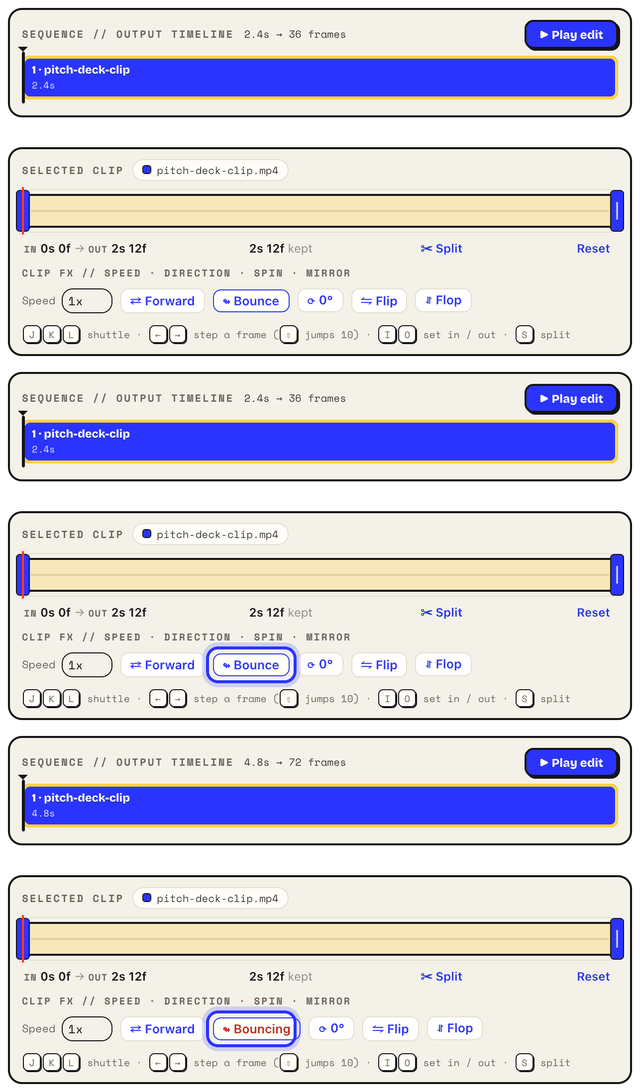
Load a video into the tool, trim it down, and flip the Bounce toggle on the clip. That is the entire operation. The clip now plays forward then backward in one pass, in the preview and in the export, and because the toggle is per clip it composes with everything else a clip carries: speed from 0.25x to 4x, reverse if you want the palindrome to lead backward, crop, rotate, captions over the top.
It also works on GIF input. An existing GIF unpacks into frames and behaves as a normal clip, so a straight loop someone else made can leave here as a boomerang. The rest of that workflow lives on the edit a GIF page.
Choosing the right one or two seconds
A boomerang is a very short film played twice, so the selection is the craft. The motions that work are the ones that reverse believably: a hair flip, a splash, a jump, a glass raised, a dog shaking off water, confetti mid-air. Physical, roughly symmetric, peaking somewhere in the middle.
The motions that fail are the ones with an arrow of time. Speech looks wrong instantly in reverse, so trim around mouths. Pouring, writing, and walking toward the camera all read as glitches on the way back. Trim tight: start the clip just before the action, end it just after the peak, and let the bounce do the rest. One to two seconds of source is the classic; the doubled playback turns that into a two to four second loop, which is exactly the attention span a loop gets.
Speed combos, and a bounce inside a sequence
Speed multiplies the effect. At 0.5x or 0.25x you get the slow-mo boomerang, the splash hanging in the air twice as long in each direction. At 2x you get the snappy kind that punctuates a chat message. Speed is set per clip, so the bounced clip can crawl while the rest of the edit runs at full pace.
And a bounce does not have to be the whole GIF. With up to ten clips in a sequence, one bouncing clip between two straight ones works as a beat: demo footage, a two-second bounce of the confetti moment, back to the demo. The toggle only touches the clip it sits on, so the clips around it play forward as usual.
The size bill for playing everything twice
No way around it: bounce roughly doubles the frames, because the return trip is new frames as far as the file is concerned. Two things claw it back. The encoder's lossless optimization stores only the changed region of each frame, which for tight, centered action leaves most of the canvas untouched in both directions. And the Extra Compression dial under All settings, at Light or Medium, typically buys back 30 to 50 percent. Keep the source selection short, hold 12 to 15 fps, and a bounced loop stays chat-sized. The wider squeeze playbook is on the small-file GIF page.
The honest word about Instagram
If the goal is a Boomerang shot live on your phone for a Story, Instagram's own capture mode does that well and this page will not pretend otherwise. This tool earns its place when the footage already exists: a clip in your camera roll, a screen recording, a video someone sent you. Or when the deliverable needs to be an actual GIF file, the kind that autoplays in Slack, Notion, a README, or a doc, with no play button and no app involved. Getting loops into Instagram specifically is covered in the Instagram guide.