A GIF is a clip now, and clips can be stacked
The multi-clip sequencer stopped being video-only the day GIF input shipped. Drop a GIF onto the clip strip and it's taken apart into frames right on your machine, after which it occupies a clip slot exactly the way an MP4 would: its own trim, its own crop, its own position in the running order, even its own ⇄ reverse toggle. Up to ten clips share one output, in any mixture. Three GIFs, two GIFs and a video, one GIF wedged between two recordings, whatever the cut calls for.
The intake rules are short. Still photos now load as five-second clips, so a PNG can serve as a title card. Transparent GIFs are composited onto white during unpacking. And a GIF longer than about two minutes imports only its opening stretch, a cap that has yet to matter for anything anyone actually stitches.
The timeline under the preview runs the show
Under the preview sits the sequence timeline: each clip rendered as a segment whose width reflects how much of the loop it owns, captions floating above as draggable bars with magnetic snap points at every cut (and at each other's edges), plus a scrubbable playhead. Press play and it rolls straight through the cuts and wraps around, behaving like the exported file rather than like three separate previews taped together.
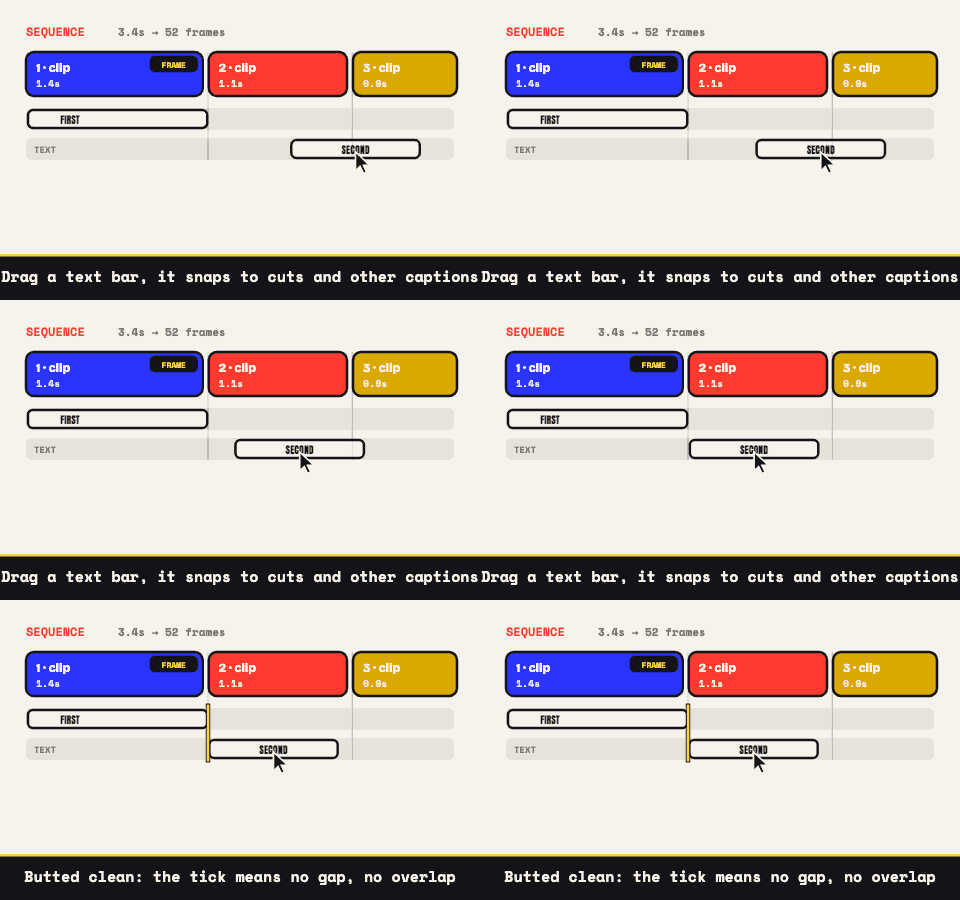
Cuts between clips are hard cuts, no dissolves, and GIF material rewards that more than video does. Each source arrives with its own baked-in palette and rhythm, and a clean cut lets the eye reset instead of asking one 256-color table to blend two GIFs mid-frame. When the order feels right, ▶ Play edit runs the complete assembly through the same pipeline that will encode it, so what loops in the preview is what ships.
The reaction sandwich, the move this was built for
Screen recording of the bug, two seconds of the perfect horrified reaction GIF, back to the recording for the fix. Or product demo, celebration GIF, demo again. Cutting to found footage in the middle of your own material is a comedy structure older than the internet, and it works in a six-second loop for the same reason it works on television: the sudden change of texture is the punchline.
Captions sharpen it further. Up to three per output, in meme or clean style, and each one either takes a timing window (label the recording "the code" and the GIF "me reviewing it") or runs untimed so a single line holds through every cut. For the wording-and-timing craft itself, the video meme generator page goes much deeper.
Three shapes walk in, one frame walks out
Every sequence has a frame clip whose trimmed, cropped dimensions become the output canvas; that's the first clip unless you tap ⛶ FRAME on another one. The choice matters more with GIFs than anywhere else, because GIFs skew tiny: a 360-pixel-wide reaction loop sitting next to a 1080p screen capture is a genuine mismatch, not a rounding error.
Clips that don't match the frame follow the Mismatched Clips setting. Crop to fill scales a clip until it covers the canvas and trims the spill, with the preview dimming exactly what gets lost. Fit with bars keeps the whole clip visible inside real black letterboxing, also shown live. The practical rule: never ask a small GIF to fill a big frame, since upscaling those already-quantized pixels reads soft and crunchy at the same time. Either hand the frame to the GIF and let the video scale down, which always looks sharp, or keep the big frame and give the GIF its bars.
Weight control for a three-source loop
Three sources of frames add up fast, so the size levers earn their keep here. Hold the output at 10 to 15 fps, since the cuts hide resampling better than a single continuous take would. Keep width around 480 to 640 pixels. Settle between 64 and 128 colors with dithering on to referee the several palettes now fighting over one file. The live estimate updates with every adjustment, so you're tuning against a number instead of a feeling.
The result exports as one GIF, as an APNG, or as a silent MP4 wherever the browser carries an encoder (Chrome, Edge, and Safari; Firefox varies). If all your sources are videos, combine videos into one GIF is the same craft with different intake, and a lone GIF that just needs surgery belongs at edit a GIF. Otherwise, load the first GIF and start cutting.