Sequencing without the timeline-software homework
The internet's advice for combining clips is usually "download an editor," which is a lot of interface for six seconds of output. Here the sequence lives in the browser: up to ten clips in a single GIF, every clip hanging on to its own trim and crop, reorderable until the cuts land in the right order. Below the preview, a sequence timeline shows the whole cut on a single strip: each clip a block sized to its share of the output, caption bars you can slide until they snap against a cut (or against each other), and a scrubbable playhead that rolls through the cuts and loops exactly like the finished GIF will. Clips no longer have to start life as video, either: a GIF drops into the lineup the same way, so two GIFs can fuse into one loop, or a reaction GIF can land between two screen recordings.
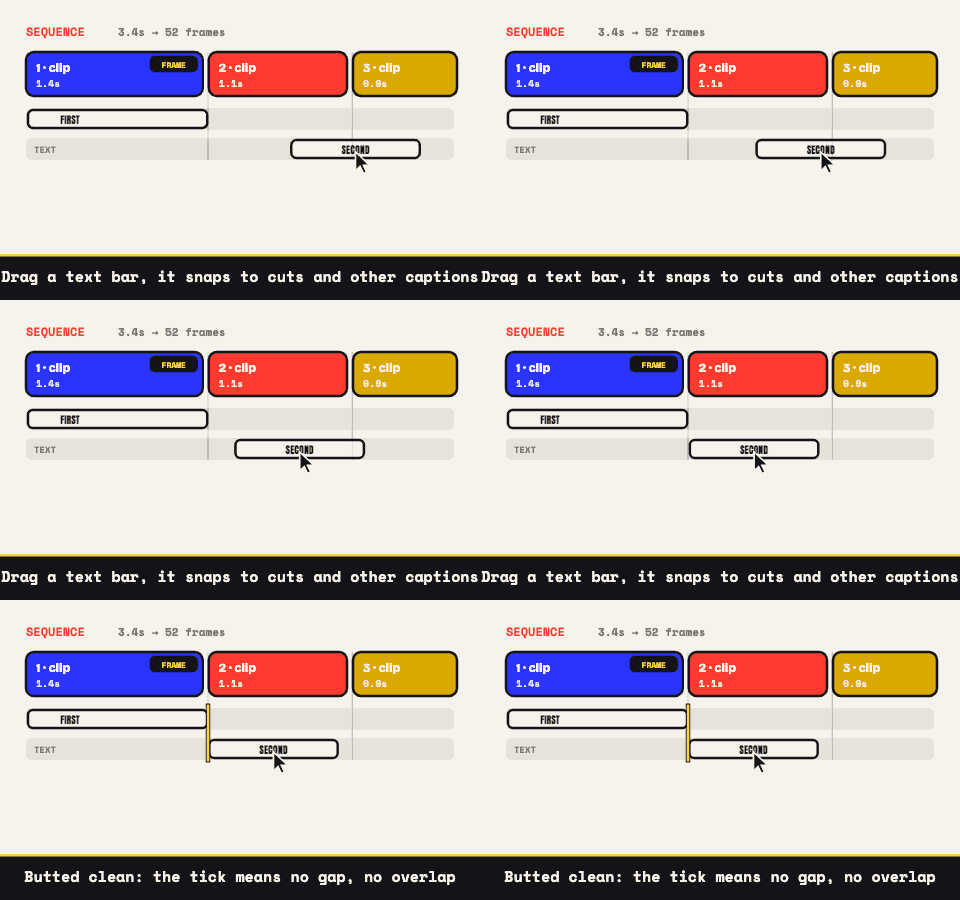
Ten slots is more room than most loops should use. Loops that get rewatched have a shape (setup, escalation, payoff; or before, beat, after), and three cuts is usually enough to build one. The ceiling is there for montages; an idea that needs all ten every time probably wants to be a video.
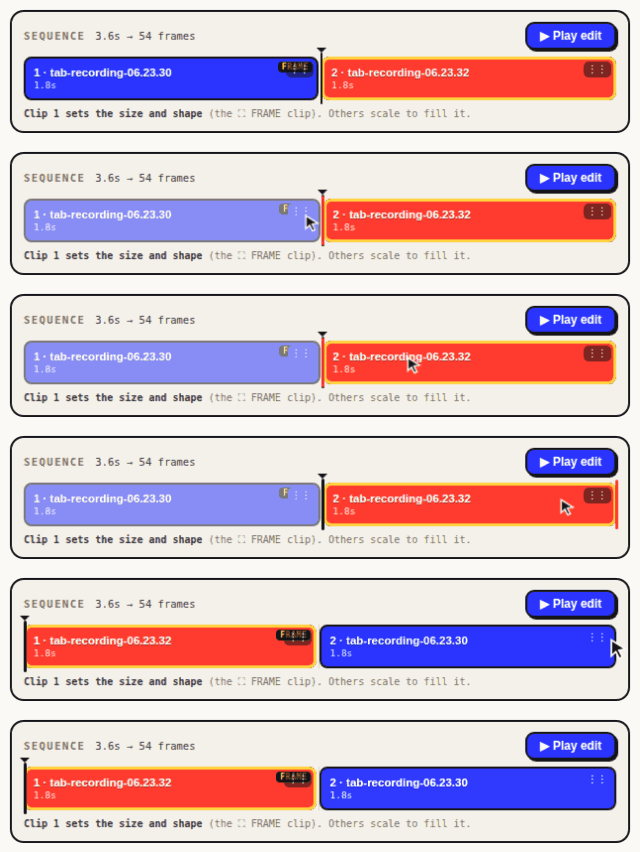
Reordering is a drag, in the good sense. Every block on the timeline carries a grip; pull it left or right and a drop marker shows where the clip will land. Each clip keeps its own color while it moves, assigned to the clip rather than the slot, so the shuffle stays legible even at ten blocks. Arrow keys on a focused grip do the same job one hop at a time.
One clip wears the frame
The output canvas belongs to the frame clip: its post-trim, post-crop dimensions become the GIF's dimensions. Clip 1 holds the job by default, and the ⛶ FRAME toggle on any clip's chip reassigns it in a click. Everything else is placed into that canvas according to the Mismatched Clips setting: Crop to fill scales each clip to cover the frame and trims the spillover (the preview dims exactly what's being lost), while Fit with bars shows the whole clip inside genuine black letterbox or pillarbox bars, previewed live. Stretching is never one of the outcomes.
Practical consequences: give the frame to the clip whose composition matters most, wherever it sits in the sequence. And when your sources disagree (a widescreen recording, a vertical phone clip, a square export), spend ten seconds per clip cropping toward a common ratio first. The locks are exact: 1:1, 9:16, 4:5, 4:3, 16:9.
In defense of the hard cut
No crossfades, no wipes, and that's deliberate. A dissolve spends a fistful of frames saying nothing while forcing the palette to describe two images at once; in a short loop at modest frame rates, that's pure waste. A hard cut costs zero frames and reads instantly, which is why every trailer you've ever half-watched is built from them.
Cut placement is where the craft goes. Trim each clip to exit on motion and let the next enter mid-action; the timeline is frame-accurate, and a tap of an arrow key slides the cut a single frame, so it sits exactly where the energy is. Sources can be mixed freely along the way: an mp4, an iPhone mov, a webm screen grab, and a GIF somebody sent you will share one output without complaint (the GIF gets cracked open into frames locally before it joins). When it all feels close, the ▶ Play edit button runs the entire assembly live (cuts, captions, bars, reversed clips) through the same pipeline that will encode the export, looping the way the final GIF will.
Text that rides across the cuts
Captions turn a sequence into a bit. The ceiling is three per GIF, in meme style (white, black-outlined, uppercase, auto-wrapping) or the clean style, which brings a color picker. Park a line top or bottom, or drop it anywhere over the footage.
Timing is the multi-clip trick: give each caption a window and you can label each clip separately ("me," "also me," "the group chat"), or leave a caption untimed and it stays up across every cut, one line over the whole before-and-after. Joke construction gets the full treatment on the video meme generator page; tidier labeling lives at the GIF maker with text.
Three clips of frames still have to fit somewhere
Each added clip brings frames, and frames are what a GIF weighs. Sequences need the size levers more than single clips do:
- Short beats. Three 1.5-second pieces make a tight 4.5-second loop; three lazy 4-second pieces make a 12-second file nobody watches twice.
- 10 to 15 fps holds. The eye resets at every cut anyway, so sequences hide a low frame rate better than single takes do.
- Width down to 480 to 640 pixels. Resolution is still the heaviest single lever on the table.
- 64 to 128 colors, dithering on. Three scenes are fighting over one palette; fewer colors plus dithering keeps the peace.
The estimate re-renders with each adjustment, so the tuning happens against a number, and the small-file rundown goes deeper when the number won't cooperate. If it flatly refuses, the Output Format switch will render the same sequence as a silent MP4 instead, wherever the browser has an encoder to offer. All of it, three files included, happens inside the tab: nothing transmitted, no cap set by somebody else's server, no account between you and the export. Drop the first clip in and start cutting.
Multi-clip edits are also the ones worth keeping. Save project writes the whole assembly, order, trims, crops, captions, fades, into a .wtg file a few kilobytes long. Reopen it later by dropping it back with the same clips and the sequence reassembles, which turns a one-off GIF into something you can re-cut when the campaign changes.