The bug that was hiding in plain sight
Start with the embarrassing one. To make a 12 fps GIF from 24 fps video, the encoder should take every second frame: 0, 2, 4, 6. It asked for exactly those moments, but each request landed precisely on the boundary between two video frames, and a rounding error sent the decoder to the frame before two times out of three. Motion advanced in uneven steps of one, two, and three frames. You felt it as a faint hitch, the kind you blame on the clip.
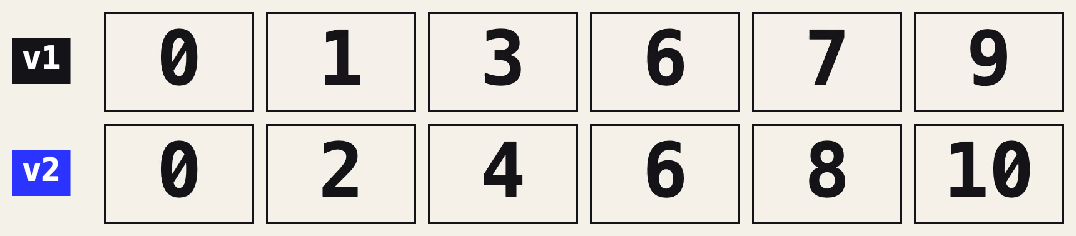
v2 aims at the middle of a source frame instead of its edge, so the choice is never a coin flip. While we were in there, timing got the same treatment. GIF delays are whole hundredths of a second, and v1 rounded each frame on its own, so a 15 fps GIF played 5% slow and a 30 fps one ran 10% fast. v2 rounds the timeline instead of the frames, alternating 7 and 6 hundredths so the total lands exactly. For a tool that sells frame-perfect trims, both were overdue.
Color picked the way your eye sorts it
A GIF frame gets 256 colors, so the encoder's real job is choosing which 256. v1 measured color difference in plain RGB, which treats a step in dark green as equal to the same numeric step in pale blue. Your eye does not. v2 works in Oklab, a color space built so that equal distances look equally different, and it builds the palette from every frame of the clip rather than a handful of samples. Cut two clips together and each scene now gets a palette of its own instead of splitting one between them.
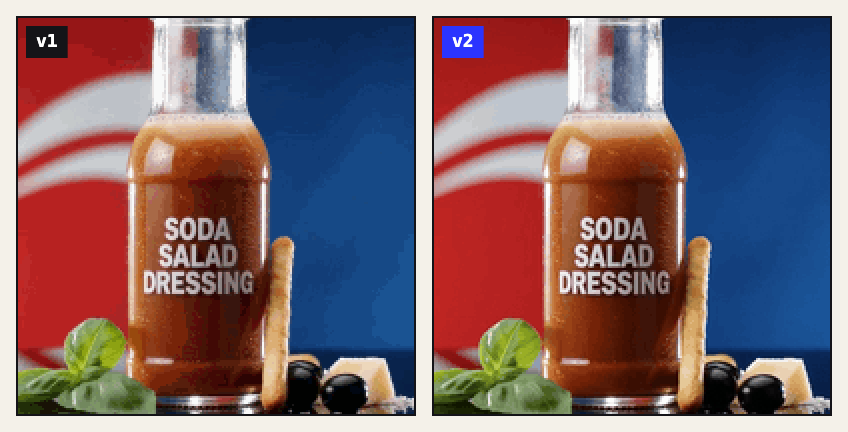
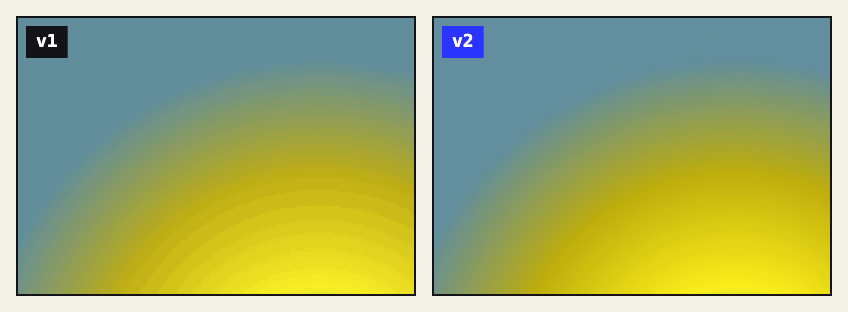
Frames also reach the encoder sharper. v2 shrinks video with a Lanczos filter and reads the decoded video directly instead of through the browser's canvas, which had been nudging blues by a couple of levels.
Dither that holds still
Dithering fakes extra shades with a fine pattern of dots. On a still image it's a gift. In an animation it becomes crawling ants, because v1 re-dithered every frame from scratch and the pattern danced even where nothing moved. Worse, a pixel that changes every frame can't be skipped, so the shimmer also made files bigger.
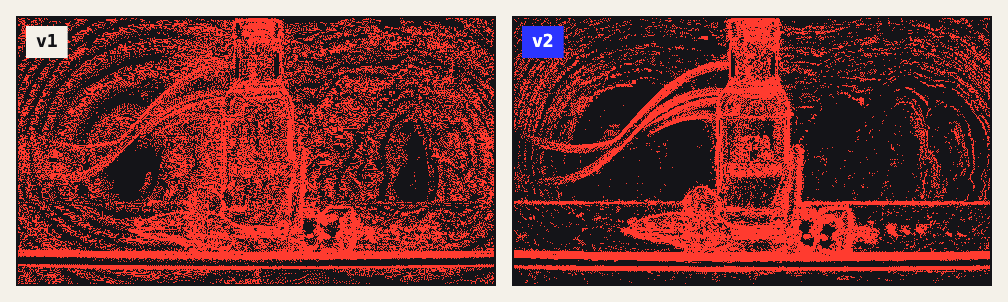
v2 keeps a pixel's color until its source really changes, cleans compression noise out of areas that hold still, and dithers only where banding would show. On our test footage that cut frame-to-frame shimmer by a factor of four to seven at High quality.
Measured, not eyeballed
Every number here comes from real exports made with the What the GIF converter, old engine and new, scored with SSIMULACRA2, a perceptual metric where about 90 reads as visually lossless and anything under 50 looks rough. Same clip, same 480 pixel width, Medium quality, compression off.
| Clip | v1 score | v2 score | v1 size | v2 size |
|---|---|---|---|---|
| Product demo (camera) | 26.8 | 76.7 | 1.6 MB | 1.7 MB |
| App promo (screen + video) | 30.1 | 80.0 | 2.3 MB | 2.8 MB |
| Smooth gradient (synthetic) | 84.2 | 95.6 | 1.1 MB | 1.9 MB |
We also run v2 against the leading open-source GIF encoders at matched file sizes. It matches or beats them in 41 of 45 of those head-to-head tests, which is why we're comfortable calling it one of the best GIF encoders on the web right now. All of it still runs inside your tab. The extra math costs your laptop a couple of seconds, not a server somewhere.
What v2 costs you, and where it still loses
- Bigger files on some content. On camera footage v2 lands within a few percent of v1. Text-heavy screen recordings run about twice as large, because v2 keeps the soft edges of letters that v1 flattened, and smooth gradients grow too. Low quality or fewer colors brings the size down: the product demo on Low comes in under v1's Medium file and scores 64 against 27.
- The tiniest files. Squeezed to the very smallest sizes, where every GIF looks broken, some encoders still go smaller than v2 will.
- Noisy line art. v2 deliberately scrubs compression grain from still backgrounds. That's usually what you want, but it is a change.
- The size estimate got a touch less exact. It now averages within about 4% of the real file, against 2% before.
One more honest note: if the destination plays video, a GIF is still the wrong container for photographic footage. MP4 will look better at a tenth of the size. When it has to be a GIF, make it on the tool; v2 is already doing the work.